Your phone system, run by us
The phone system runs on our servers, we set it up and look after it. You call with the nuxfon app on your phone and your computer. And if you use nuxbe, every call shows you who is on the line.
Book a free first callYou decide where a call goes
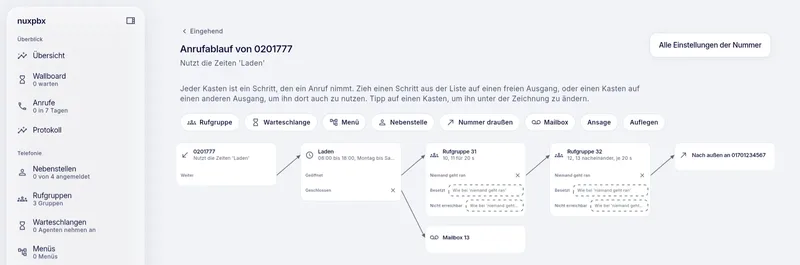
Every number has its call flow made of business hours, ring groups, queue, menu, mailbox or forwarding outside. You drag the steps into the drawing and try a call for a given day and time before it is real.
What it does
Hosted by us
No server and no phone system in your office. We set the phone system up on our servers, connect it to your phone provider and keep it running.
nuxfon on phones and computers
The nuxfon app is available for iOS and Android as well as Windows, macOS and Linux. It rings even when it is closed. In the office, on the road and at home you are reachable on the same extension.
Connected to nuxbe
When a customer calls, the app shows their name from nuxbe along with customer number, open items and open tickets. Every call lands in the contact's history with direction and duration, missed calls included. After the call you log a note, a ticket or the work time right away.
Queues and voice menus
Callers wait in a queue, hear their position and can ask for a call back. A voice menu sends them to sales, support or accounting at the press of a key. A wallboard shows who is waiting and who is free.
Mailbox, business hours, announcements
Every extension has a mailbox, new messages arrive by mail with the recording. Business hours, days off and announcements are set per number.
Desk phones
Besides the app, regular SIP desk phones work too, for example from Yealink, Snom, Fanvil or Grandstream. We take care of setting them up.
Recording and AI transcripts
If you want, the phone system records calls, for single extensions or queues. With the AI extension a transcript with a summary is made from it and kept in nuxbe at the contact. Important: whoever records has to tell the other side beforehand. We set up that announcement with you.
Moving over from FreePBX or 3CX
If you already run a FreePBX or 3CX, we carry its setup over from the old system's backup, recordings included. Whatever cannot be carried over is listed afterwards.
Everything about the app itself is on the nuxfon page
Let's talk about your phones
In a free first call we look at how many seats you need, how your calls run today and whether nuxbe is already in use.
Book a free first call